
Is Your Laptop Dying, or Just Suffocating?
Let’s be real.
In India, a laptop isn’t just a piece of plastic and silicon. It’s an investment. It’s the tool that helped you finish your degree, land your first job, or start your side hustle.
Remember the day you unboxed your hp laptop 14s cf1xxx? The sleek finish, the portability, and the promise of speed. It was perfect.
But today? Things look different.
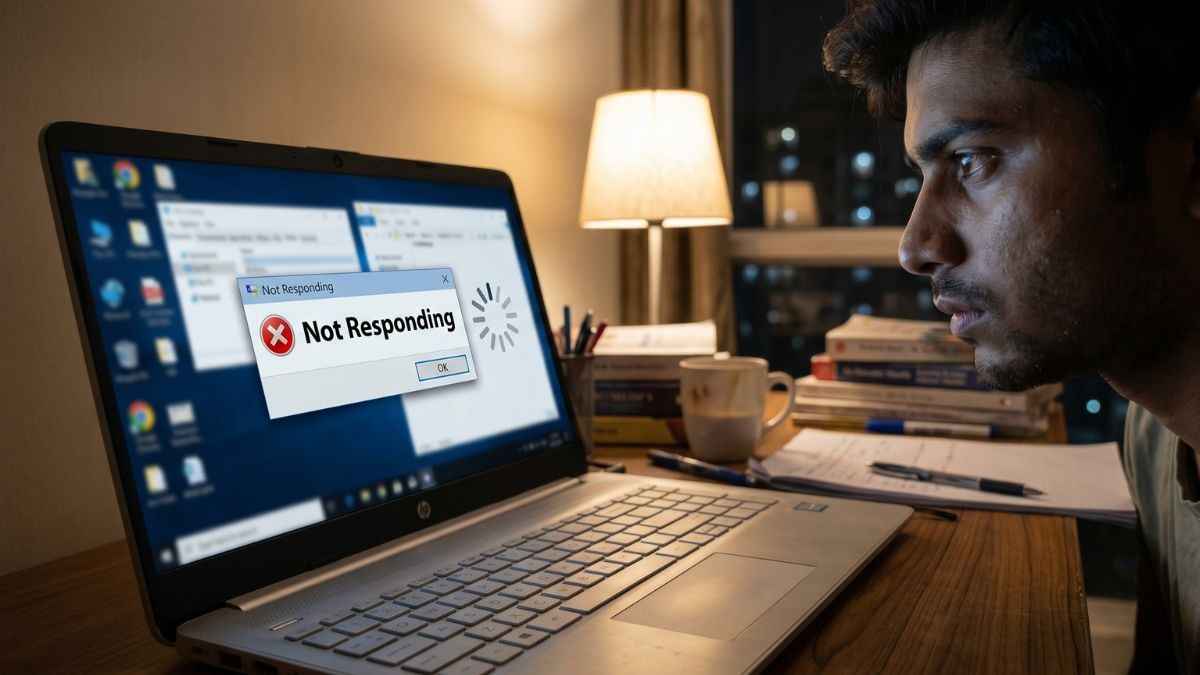
Maybe you’re staring at a spinning loading icon for five minutes every time you boot up. Maybe your fan sounds like a jet engine when you open more than three Chrome tabs. Or worse, the “Not Responding” error has become your most frequent visitor.
It’s frustrating. I get it.
Most people in this situation think the same thing: “My laptop is old. I need to spend ₹60,000 on a new one.”
But here is the “Neil Patel” secret: You are probably wrong.
The hp laptop 14s cf1xxx is not a “slow” laptop. It is a “bottlenecked” laptop. In 2026, software has become heavier, but your hardware hasn’t changed. The good news? This specific model was built with a hidden superpower—scalability.
You don’t need a new machine. You need a performance strategy. By spending a fraction of the cost of a new laptop, you can turn your hp laptop 14s cf1xxx into a speed beast that rivals 2026 models.
In this guide, I’m going to show you exactly how to do it. No jargon. No fluff. Just pure performance.
The Technical Specs Decoder – What’s Really Inside?
To win at performance, you have to understand your gear. Most Indian users see the hp laptop 14s cf1xxx as a “budget” device, but I see a goldmine of hidden potential.
The “xxx” in the model name is simply a placeholder for regional versions (like the popular cf1012tu). Regardless of the specific numbers, the core DNA of the hp laptop 14s cf1xxx is built on a very solid foundation.
The Brain: 8th Gen Intel Power
The heart of the hp laptop 14s cf1xxx is usually an Intel Core i3-8145U or an i5-8265U.
Here is a quick lesson: These were the first “U-series” processors to offer a massive jump in core counts. The i5 version features 4 cores and 8 threads. In 2026, that is still the “sweet spot” for 90% of office work, student assignments, and streaming.
If your laptop feels slow, it’s not because the “brain” is weak; it’s because the “nervous system” (RAM and Storage) is outdated.
The Connectivity Advantage
Unlike modern ultra-thin laptops that force you to buy expensive dongles, the hp laptop 14s cf1xxx was designed for the real world. You have:
- A Full-sized HDMI Port: Perfect for connecting to an external monitor or your TV.
- USB Type-C: For modern high-speed data transfer.
- SD Card Reader: A feature that many ₹1 Lakh laptops have now removed!
Technical Specs Breakdown
| Feature | Standard Configuration | The 2026 Potential |
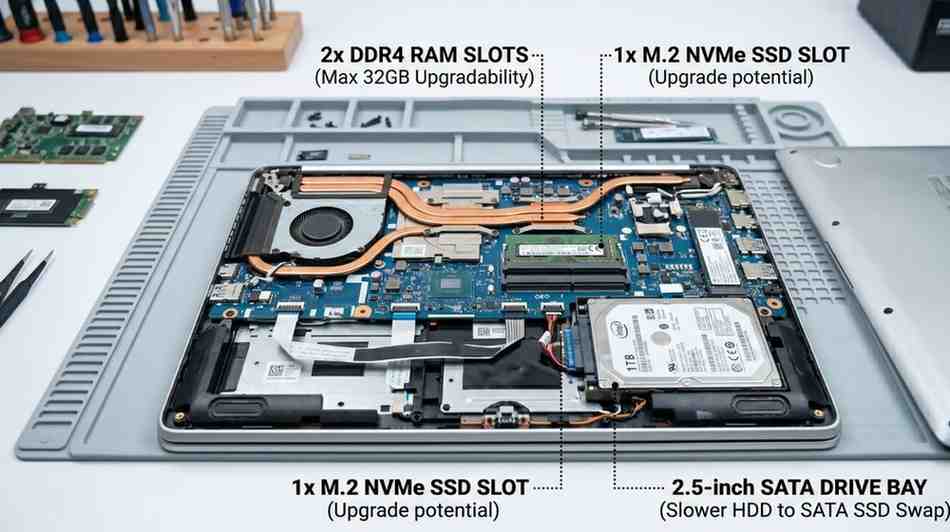
| RAM | 4GB or 8GB DDR4 | Upgradable to 16GB/32GB |
| Storage | 1TB HDD or 256GB SSD | Supports NVMe M.2 + SATA |
| Display | 14″ Micro-edge | Compact and Portable |
| Weight | ~1.43 kg | Easier to carry than most new budget laptops |
The “Dual-Storage” Secret
This is where the hp laptop 14s cf1xxx beats almost every other competitor in its price bracket. It has two internal slots. You can keep a fast SSD for your Windows boot-up and a massive HDD for all your movies, photos, and files.
The Bottom Line: Your machine has the skeletal structure of a premium laptop. The reason it’s lagging is that it’s likely running on “factory default” settings that weren’t meant for 2026 software.
2026 Benchmarking – How Much Power Do You Really Have?
Let’s talk numbers.
In the tech world, there is a lot of “hype.” Every year, brands tell you that you need the newest chip to open a Word document. But I’m a data-driven guy. I like to see the actual performance before I tell you to spend a single Rupee.
When we benchmark the hp laptop 14s cf1xxx against the budget laptops being sold in India today (the ₹25,000 to ₹35,000 range), the results are shocking.
The Real-World Performance Test
The 8th Gen Intel chips inside the hp laptop 14s cf1xxx actually outperform many “brand new” Celeron and Pentium processors. Why? Because the hp laptop 14s cf1xxx uses “Performance” cores, while new budget chips are often “Efficiency” cores designed only for very light tasks.
Here is how your machine handles 2026 tasks:
- Web Browsing (15+ Tabs): Smooth (Requires 8GB+ RAM).
- 4K Video Streaming: Perfect (Thanks to built-in hardware acceleration).
- Office Productivity: Fast (Excel and heavy PDFs load easily).
- Video Editing: Great for 1080p YouTube/Instagram Reels, but struggles with 4K.
The Thermal Reality
If your hp laptop 14s cf1xxx feels slow after an hour of work, it isn’t a “software” problem. It’s a heat problem.
Because the chassis is thin, heat builds up quickly. When the temperature rises, the CPU intentionally slows down to stay cool. This is called “Thermal Throttling.” Most users mistake this for the laptop being “old,” but in reality, your laptop just needs to breathe.
The 2026 Verdict
The hp laptop 14s cf1xxx is still in the “Green Zone” for 90% of users. If you are a student, a freelancer, or a remote professional, this machine has enough “muscle” to last you another 3 years.
The only thing stopping you is the Hardware Bottleneck.
The Performance Transformation – Upgrades That Matter
Let’s talk about “The Transformation.”
In India, we have a saying: “Paisa Vasool.” We want every single Rupee to work for us. If your hp laptop 14s cf1xxx is lagging, it’s not because the processor is old—it’s because the RAM and Storage are stuck in 2019.
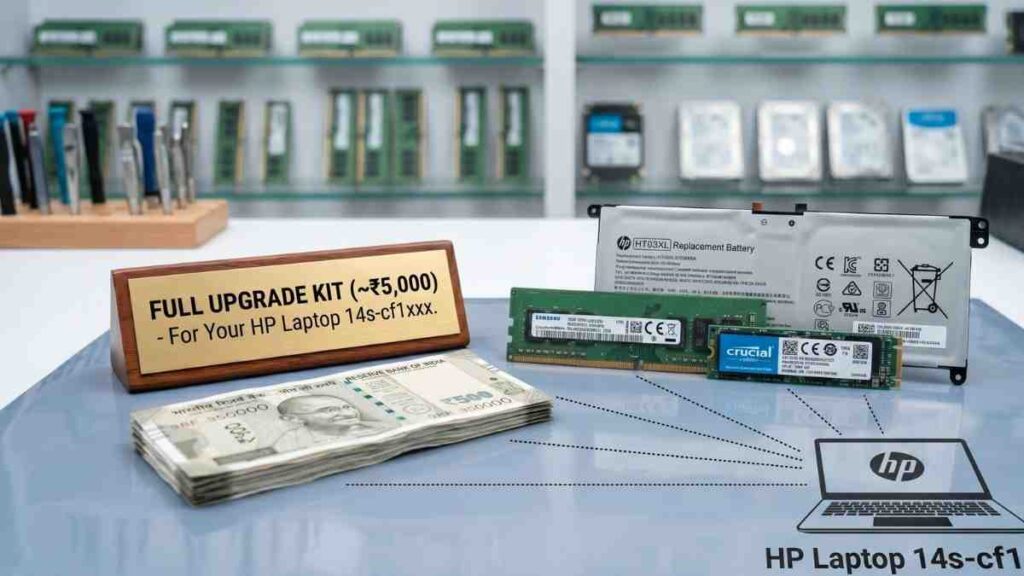
For less than ₹5,000, you can give your hp laptop 14s cf1xxx a performance boost that makes it feel like a ₹60,000 machine. Here is how you do it.
1. The RAM Boost (Multi-tasking Hero)
Most hp laptop 14s cf1xxx units shipped with 4GB or 8GB of RAM. In 2026, Windows 11 alone uses about 3.5GB just to stay on. If you open 5 Chrome tabs, you are out of memory.
- The Upgrade: Add an 8GB or 16GB DDR4 SODIMM stick.
- The Technical Spec: You need DDR4 2400MHz or 2666MHz (3200MHz also works but will run at 2400/2666 speed).
- The Cost: Approx. ₹1,800 to ₹6,500.
- Amazon India Pick: [Check Price: Crucial 8GB DDR4 RAM for HP Laptop on Amazon]
2. The SSD Revolution (The Speed Demon)
If your hp laptop 14s cf1xxx is still running on a mechanical 1TB Hard Drive (HDD), you are wasting your time. An HDD is like a bullock cart; an SSD is like a Bullet Train.
- The Upgrade: Install an M.2 NVMe SSD.
- The Result: Your laptop will boot in 10 seconds instead of 2 minutes. Apps will open instantly.
- The Cost: Approx. ₹2,500 for 500GB.
- Amazon India Pick: [Check Price: Samsung 980 NVMe SSD on Amazon India]
3. The Battery Life Hack
If your hp laptop 14s cf1xxx dies within 45 minutes, it’s time for a new cell. Don’t throw the laptop away just for a battery.
- The Part Number: Look for the HT03XL battery.
- The Cost: Approx. ₹1,800 to ₹2,500 for a high-quality compatible version.
- Amazon India Pick: [Check Price: HP HT03XL Compatible Battery on Amazon]
Why These Upgrades?
When you upgrade the hp laptop 14s cf1xxx, you aren’t just making it “faster.” You are making it efficient. An SSD uses less power than an HDD, so your battery lasts longer. More RAM means your CPU doesn’t have to work as hard to swap data, so your laptop stays cooler.
Patel Style Tip: Don’t just “buy” parts. Invest in the right ones. If you buy a cheap, unbranded RAM stick, your hp laptop 14s cf1xxx might crash. Stick to brands like Crucial, Samsung, or Kingston.
Windows 11 & Driver Stability – Smooth Software, Fast Laptop
Hardware is the body, but software is the soul. You can put the best RAM in your hp laptop 14s cf1xxx, but if your drivers are outdated, you will still face lags and crashes.
In 2026, Windows 11 is the standard. Many users worry that their hp laptop 14s cf1xxx can’t handle it. The truth? It can—if you optimize it correctly.
1. Official Driver Updates (The Stability Factor)
For the hp laptop 14s cf1xxx, HP provides official support for Windows 10 and 11. However, Windows Update doesn’t always give you the latest drivers.
- The Must-Have: Download the HP Support Assistant. It will automatically scan your hp laptop 14s cf1xxx for BIOS updates and chipset drivers.
- Why BIOS matters: A BIOS update can improve how your laptop manages power and heat. If your fan is too loud, a BIOS update might fix the “fan curve” to keep things quiet.
2. Windows 11 Optimization Hacks
Windows 11 looks beautiful, but the transparency effects and animations can eat up your CPU cycles. Here is how to keep your hp laptop 14s cf1xxx snappy:
- Visual Effects: Search for “Adjust the appearance and performance of Windows” and select “Adjust for best performance.” (You can keep “Smooth edges of screen fonts” checked to keep text looking sharp).
- Startup Apps: Press Ctrl + Shift + Esc, go to the Startup tab, and disable everything you don’t need (like Spotify, Cortana, or Steam). This alone can save 20-30% of your RAM.
- Power Mode: Go to Settings > System > Power & Battery. Set the Power Mode to “Best Performance” when plugged in.
3. The “Bloatware” Clean-up
HP laptops often come with pre-installed apps like “HP JumpStart” or trial versions of Antivirus.
- Patel Tip: Use the built-in Windows “Add or Remove Programs” to uninstall anything you haven’t used in 3 months. Every unused app is a “hidden weight” on your hp laptop 14s cf1xxx.
4. Windows 11 Compatibility Check
The hp laptop 14s cf1xxx (with 8th Gen Intel) officially supports TPM 2.0 and Secure Boot. If you are stuck on Windows 10, you can safely upgrade to Windows 11 using the official “Windows 11 Installation Assistant.” It will give your laptop a fresh, modern feel for 2026.
The Bottom Line: Don’t let bad software ruin good hardware. A clean install or a simple driver sweep can make your hp laptop 14s cf1xxx feel 2x faster without spending a Rupee on software.
Thermal Management – Keeping Your Laptop Cool & Quiet
In India, our laptops face a tough enemy: Heat and Dust. The hp laptop 14s cf1xxx is a thin machine. While that makes it look great, it also means there isn’t much room for airflow. If your laptop feels hot to the touch or if the fan sounds like a mini-helicopter, your performance is being killed by “Thermal Throttling.”
Here is how you can keep your hp laptop 14s cf1xxx cool for years to come.
1. The Dust Factor
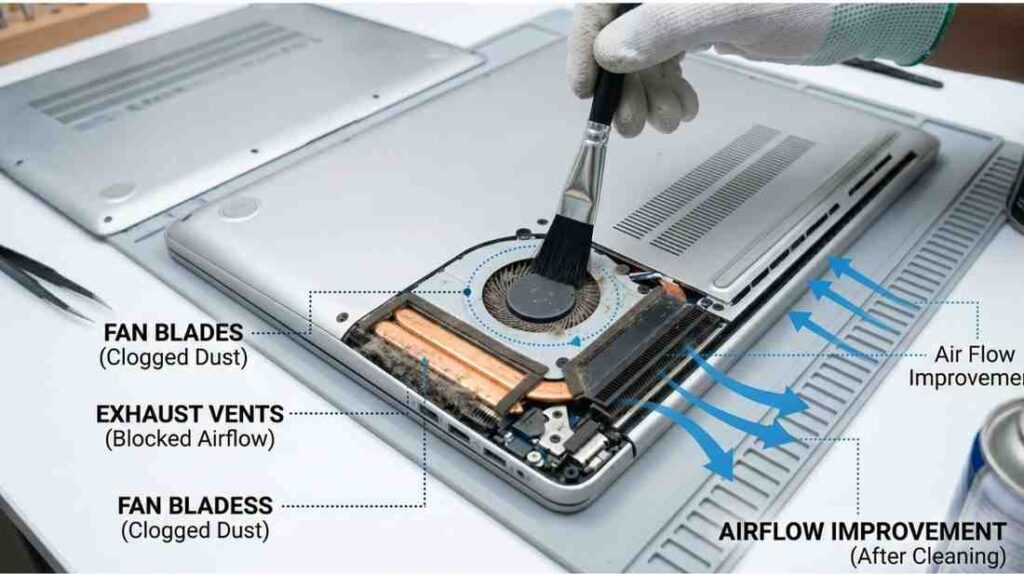
Dust settles inside the vents and on the fan blades. This prevents the hot air from escaping.
- The Fix: Use a can of compressed air once every 6 months to blow out the dust from the side and bottom vents.
- The Pro Tip: If you are comfortable opening the back panel, use a soft brush to clean the fan. You’ll be surprised how much “jam” is stuck in there!
2. Thermal Paste: The 2026 Refresh
Thermal paste is the “bridge” that transfers heat from your CPU to the copper heatsink. Over 4-5 years, this paste dries up and becomes a “wall” instead of a bridge.
- The Result: Your CPU hits 90°C and slows down to save itself.
- The Solution: Apply a high-quality thermal paste like Arctic MX-4. It costs around ₹600 on Amazon and can drop your temperatures by 15°C instantly.
3. Smart Habits for Battery Longevity
The battery in your hp laptop 14s cf1xxx is a consumable. To make it last through 2026 and beyond:
- Avoid 100% Constant Charging: If you use your laptop at a desk all day, don’t leave it plugged in 24/7. It stresses the cells.
- The “Sweet Spot”: Try to keep your battery between 20% and 80%.
- Calibration: Once a month, let it drain to 5% and then charge it to 100% while it’s turned off.
4. Use a Cooling Pad
If you use your hp laptop 14s cf1xxx for heavy tasks like Photoshop or light gaming, invest in a simple cooling pad.
- Pick: [Check Price: Zinq Five Fan Cooling Pad on Amazon India]
- Why it works: It forces fresh air into the bottom intake vents, keeping the internal temperatures stable.
The Final Verdict – Should You Save or Sell Your HP Laptop 14s-cf1xxx?
Let’s be real. In a world of “new launches” every week, it’s easy to feel like your tech is outdated. But as we’ve seen, the hp laptop 14s cf1xxx is a survivor.
If you go to a showroom today in Noida or Delhi, a salesperson will try to sell you a new “budget” laptop for ₹35,000. But that laptop might actually have a weaker processor than what’s already inside your hp laptop 14s cf1xxx.
The “Smart Money” Comparison
| Feature | Buying New (Budget) | Upgrading Your 14s-cf1xxx |
| Total Cost | ₹35,000 – ₹45,000 | ₹4,000 – ₹6,000 |
| Performance | Basic / Entry-level | High-speed (SSD + 16GB RAM) |
| Hassle | Transferring all data | Keep all your files exactly as they are |
| Sustainability | Creates E-waste | Eco-friendly (Reuse & Recycle) |
My Final Recommendation
If your screen is broken or your motherboard is dead, then yes, buy a new one. But if your hp laptop 14s cf1xxx is just “slow,” then upgrading is the only decision that makes sense for your wallet.
For the price of two family dinners, you can have a laptop that boots in seconds, never freezes during a Zoom call, and handles 20 Chrome tabs without breaking a sweat.
Patel Style Action Step: Don’t wait for your laptop to crash completely. Grab a 500GB SSD and an 8GB RAM stick today. Spend one Saturday afternoon on the upgrade, and I promise you’ll feel like you just saved ₹50,000.
HP Pavilion Gaming Laptop 2026 | RTX 4050/4060 ₹58,990 | Best Budget Gaming India
1 thought on “HP Laptop 14s-cf1xxx: The Master 2026 Performance & Upgrade Guide”